



Download ReggaetonRadios – Free Reggaeton Radio Stations App for Windows
Overview
ReggaetonRadios is a lightweight Windows application that brings the vibrant world of reggaeton straight to your desktop. Designed with a nostalgic Winamp‑style skin, the app lets you browse, select, and stream dozens of online reggaeton radio stations with just a few clicks. Whether you’re a casual listener looking for the latest hits or a die‑hard fan eager to discover underground beats, ReggaetonRadios offers a dedicated hub that eliminates the need to juggle multiple browser tabs.
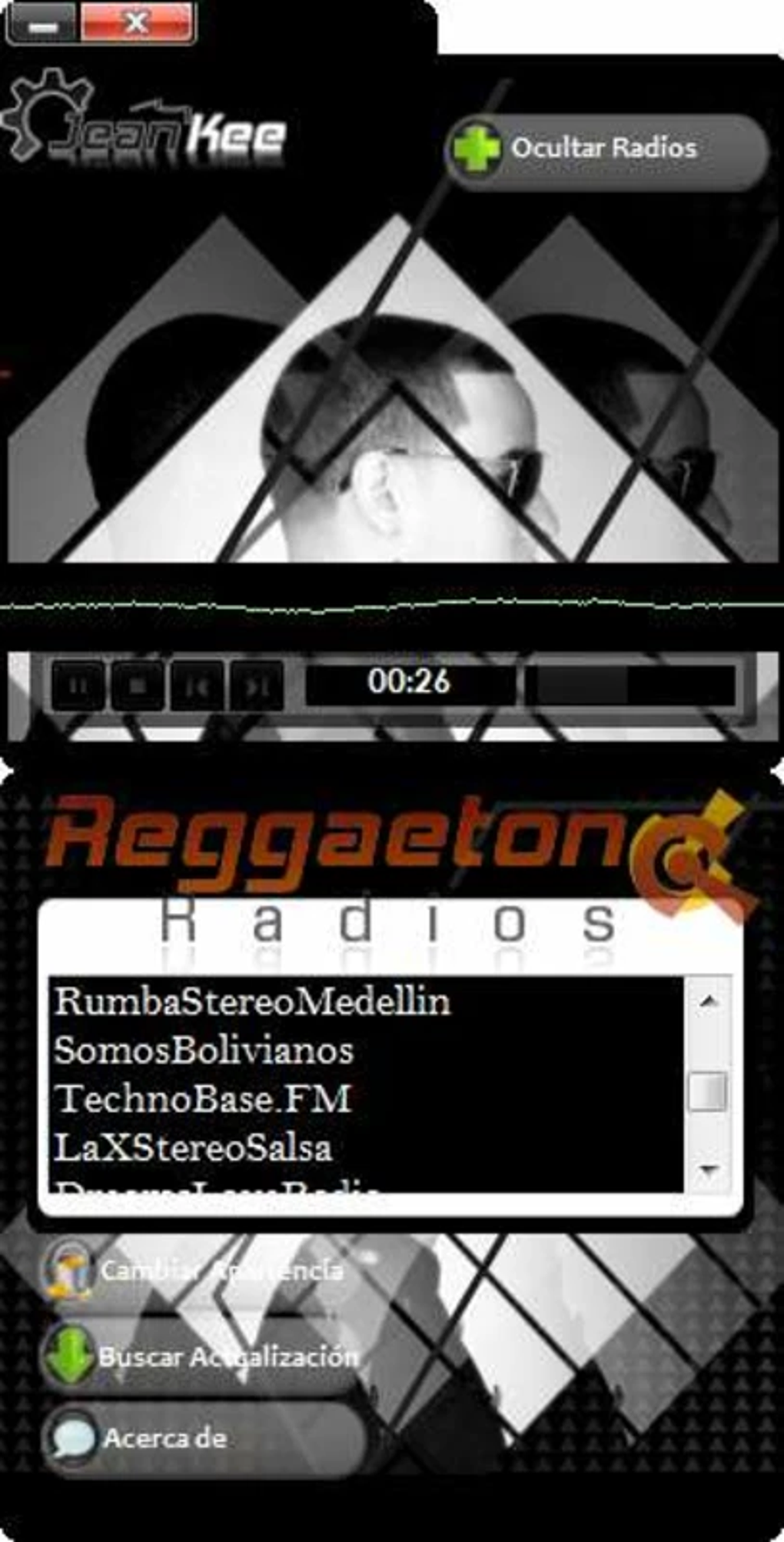
The interface is intentionally simple: a station list on the left, a large playback window in the center, and customizable visual skins on the right. While the core purpose is streaming audio, the real charm lies in the personalization options – you can display images of your favorite reggaeton artists, create custom skins, or even let the app rotate through a gallery of album covers while the music plays. A stable internet connection is required for uninterrupted streaming, but the app itself consumes minimal system resources, making it ideal for both high‑end PCs and modest laptops.
ReggaetonRadios is free to download, regularly updated, and does not bundle unwanted adware, ensuring a secure and smooth listening experience.
Key Features
- Extensive Station Catalog – Access over 150 curated reggaeton radio streams from Latin America, the Caribbean, and Europe.
- Winamp‑Inspired Interface – Familiar layout with play, pause, skip, and volume controls that feel instantly recognizable.
- Customizable Skins – Upload artist photos, album art, or personal graphics to create a unique visual theme.
- One‑Click Playback – Start a station instantly without navigating through complex menus or pop‑ups.
- Low Resource Footprint – Optimized for smooth operation on Windows 7, 8, 10, and 11 without draining CPU or RAM.
- Auto‑Update System – The app checks for new station URLs and software patches each time it launches.
- Bookmark Favorites – Save your top stations for quick access and organize them into custom playlists.
- Volume Normalizer – Keeps audio levels consistent across different stations, preventing sudden spikes.
- Secure Streaming – All stations use HTTPS where available, ensuring a safe data connection.
Installation & Compatibility
Step‑by‑Step Installation Guide
Getting ReggaetonRadios up and running takes less than five minutes. Follow these steps for a hassle‑free setup:
- Visit the official download page and click the Download ReggaetonRadios button. The installer file (
.exe) is less than 15 MB. - When the download finishes, locate the file in your Downloads folder and double‑click it to launch the wizard.
- Accept the End‑User License Agreement, then choose an installation directory (the default
C:\Program Files\ReggaetonRadiosworks for most users). - Click Install. The progress bar will complete in a few seconds, after which you can select Run ReggaetonRadios to launch the program immediately.
- On first launch, the app will prompt you to allow internet access. Click Allow so the station list can be fetched.
System Requirements & Operating System
ReggaetonRadios runs on all modern Windows operating systems, including Windows 7, 8, 8.1, 10, and 11 (both 32‑bit and 64‑bit builds). Minimum hardware specifications are modest:
- CPU: 1 GHz or faster (dual‑core recommended)
- RAM: 512 MB (1 GB recommended for smoother multitasking)
- Hard Drive: 50 MB free space for installation and temporary cache
- Internet: Broadband connection with at least 1 Mbps download speed for optimal audio quality
The application does not require additional codecs or third‑party plugins, and it integrates seamlessly with Windows sound settings, allowing you to route audio to headphones, speakers, or Bluetooth devices. If you encounter any issues, the built‑in Diagnostics tool can test network connectivity, verify station URLs, and suggest fixes.
Pros & Cons
What Users Love
- Focused on reggaeton – no irrelevant stations cluttering the list.
- Highly customizable visual skins keep the interface fresh and personal.
- Lightweight and fast; it launches instantly even on older PCs.
- Free, ad‑free, and regularly updated by the developer.
- Intuitive one‑click playback eliminates the learning curve.
Areas for Improvement
- Limited to Windows – no official macOS, Android, or iOS versions yet.
- No built‑in equalizer; users must rely on external audio tools for advanced tweaking.
- Station list depends on external streams; occasional dead links may appear.
- Lacks a built‑in chat or social sharing feature for community interaction.
- Customization requires basic image editing skills for creating skins.
Frequently Asked Questions
Is ReggaetonRadios completely free?
Yes, the application is free to download and use. There are no hidden fees, subscription plans, or mandatory in‑app purchases.
Can I use ReggaetonRadios on macOS or mobile devices?
Currently, ReggaetonRadios is built exclusively for Windows. The developer has hinted at possible macOS and Android versions in future updates, but no official release dates have been announced.
How do I create a custom skin?
From the main window, click the Skin Manager button, then select Import Image. Choose a JPG or PNG file (recommended size 800 × 600 px). After importing, you can rename the skin and set it as the default. For advanced layouts, edit the accompanying XML file located in the Skins folder.
What internet speed do I need for optimal streaming?
A minimum broadband connection of 1 Mbps is sufficient for standard‑quality audio. For higher bitrate streams (128 kbps or above), a stable 3 Mbps connection is recommended to avoid buffering.
Does the app collect any personal data?
ReggaetonRadios does not require a user account and does not store personal information. The only data transmitted is the request for station URLs, which is encrypted when the source supports HTTPS.
Conclusion & Call to Action
ReggaetonRadios fills a niche that many mainstream radio apps overlook: a dedicated, customizable hub for reggaeton lovers on the Windows platform. Its blend of low‑resource performance, intuitive controls, and visual personalization makes it a compelling choice for anyone who wants to keep the beats flowing without the distraction of unrelated stations. While the absence of macOS or mobile versions may limit its audience, the free and ad‑free nature of the software ensures that Windows users get a premium experience without paying a cent. Ready to add a fresh rhythm to your desktop? Download ReggaetonRadios now and start streaming the hottest reggaeton tracks instantly.







